
- ImageCLEF 2027
- ImageCLEF 2026
- LifeCLEF 2026
- ImageCLEF 2025
- LifeCLEF 2025
- ImageCLEF 2024
- LifeCLEF 2024
- ImageCLEF 2023
- LifeCLEF 2023
- ImageCLEF 2022
- LifeCLEF2022
- ImageCLEF 2021
- LifeCLEF 2021
- ImageCLEF 2020
- LifeCLEF 2020
- ImageCLEF 2019
- LifeCLEF 2019
- ImageCLEF 2018
- LifeCLEF 2018
- ImageCLEF 2017
- LifeCLEF2017
- ImageCLEF 2016
- LifeCLEF 2016
- ImageCLEF 2015
- LifeCLEF 2015
- ImageCLEF 2014
- LifeCLEF 2014
- ImageCLEF 2013
- ImageCLEF 2012
- ImageCLEF 2011
- ImageCLEF 2010
- ImageCLEF 2009
- ImageCLEF 2008
- ImageCLEF 2007
- ImageCLEF 2006
- ImageCLEF 2005
- ImageCLEF 2004
- ImageCLEF 2003
- Publications
- Old resources
You are here
Robot Vision 2012
Welcome to the website of the 4th edition of the Robot Vision Challenge!
The fourth edition of the Robot Vision challenge follows three previous successful events. As for the previous editions, the challenge will address the problem of visual place classification, this time with the use of images acquired with the kinect depth sensor.

Mobile robot platform
used for data acquisition.
News
- 01/03/2012 - Registration for the task is now open.
- 09/03/2012 - Best Submissions awards and travel scholarships
- There will be awards for the highest ranked runs, as well as for the most innovative approach as described in the ImageCLEF working notes paper (for submission deadline/details please see below). We will also offer a limited number of travel scholarships for students who will be the first author of the working note paper describing a submitted run.
- 02/04/2012 - Training sequences are now available.
- 21/05/2012 - Test Data Release.
- 22/06/2012 - Release of preliminary results.
- The results for the task has been released. The winner for the obligatory and the optional task is the CIII UTN FRC group.
- 16/07/2012 - Journal Publications.
- We are pleased to announce that Machine Vision and Application has accepted our proposal for a special issue on the ImageCLEF 2012 Robot Vision Task! The call for papers is expected to be published by the end of this year/first quarter of the next
- 06/09/2012 - All data is now available.
- In order to make all the challenge information available, annotations have been added to the test sequences (test1 and test2). You all can download the complete sequences with the visual images, depth images and locations from http://fast.hevs.ch/robotvision/ . The user and pass for downloading the data can be found in http://medgift.hevs.ch:8080/CLEF2012/faces/faces/CollectionDetail.jsp?id...
You can follow Robot Vision 2012 on Facebook
Organisers
- Barbara Caputo, Research Institute, Martigny, Switzerland, bcaputo@idiap.ch
- Jesus Martinez Gomez, University of Castilla-La Mancha, Albacete, Spain, jesus.martinez@uclm.es
- Ismael Garcia Varea, University of Castilla-La Mancha, Albacete, Spain, Ismael.Garcia@uclm.es
Contact
For any doubt related to the task, please refer to Jesus Martinez Gomez using his email: jesus.martinez@uclm.es
Overview
The fourth edition of the RobotVision challenge will focus on the problem of multi-modal place classification. Participants will be asked to classify functional areas on the basis of image sequences, captured by a perspective camera and a kinect mounted on a mobile robot within an office environment. Therefore, participants will have available visual (RGB) images and depth images generated from 3D cloud points.
The test sequence will be acquired within the same building and floor but there can be variations in the lighting conditions (sunny, cloudy, night) or the acquisition procedure (clockwise and counter clockwise). This edition will have several awards for the best submissions, judged in terms of performance and scientific contribution (see below for further details).
Citation
If you are using the RobotVision2012 sequences or information for your research, please consider cite the Overview Paper in your articles:
- Martinez-Gomez, J., Garcia-Varea, I. and Caputo, Barbara. Overview of the ImageCLEF 2012 Robot Vision Task. In CLEF 2012 Evaluation Labs and Workshop, Online Working Notes, Rome, Italy, September 17-20, 2012. I.S.B.N.: 978-88-904810-3-1
Schedule
- 01/03/2012 - Registration open for the task.
- 02/04/2012 - Training data and task release.
- 21/05/2012 - Test data release
- 15/06/2012 - Submission of runs
- 22/06/2012 - Release of results
- 06/09/2012 - Release of all data (including annotations for test sequences)
- 17-22/09/2012 - CLEF 2012 conference in Rome
Results
| Task 1 (Obligatory) |
| Groups | Runs | ||||||||||||||||||||||||||||||||||||||||||||||||||||||||||||||||||||||||||||||||||||
|
|
| Task 2 (Optional) |
| Groups | Runs | |||||||||||||||||||||||||||||||||
|
|
The Task
Two different tasks will be considered in this edition: task 1 and task 2. For both tasks, participants should be able to answer the question "where are you?" when presented with a test sequence imaging a room category seen during training.
The main difference between both tasks will be the presence (or lack) of kidnappings in the final test sequence and also the availability on the use of the temporal continuity of the sequence. The importance of kidnappings is explained below.
Task 1 (mandatory)
- Test frames have to be classified without using the temporal continuity of the test sequence.
- Lack of kidnappings in the final test sequence.
Task 2 (optional)
- Participants can take advantage of the temporal continuity of the test sequence.
- Presence of kidnappings in the final test sequence.
- Additional points for fames after a kidnapping if they are correctly classified.
The data
The main novelty of this edition will be the availability of depth images, acquired with the kinect device. These images will be provided in addition to the visual images acquired with a perspective visual camera. Depth images are stored as visual ones by using the openkinect library.
Participants are allowed to use additional tools to generate the 3D point cloud from these images. We provide a python script depth2cloud.zip that generates .pcd 3D point cloud files from kinect depth images. Generated files are an approximation to real point cloud files and participants are allowed to modify/improve this script.


Example of RGB and Depth images
Depth to Cloud
We provide a python script depth2cloud.zip that generates .pcd 3D point cloud files from kinect depth images. Generated files are an approximation to real point cloud files and participants are allowed to modify/improve this script.
The script depth2cloud.py can simply be executed as a script. Given that Python is already installed, running the script without any parameters will produce the following usage note:
/======================================================================\
|                            depth2cloud.py                            |
|----------------------------------------------------------------------|
| RobotVision@ImageCLEF'12 Point Cloud Library Images Generator Script |
| Author: Jesus Martinez-Gomez                                         |
\======================================================================/

Error: Incorrect command line arguments.

Usage: depth2cloud.py input_depth_image output_cloud_image

Arguments:
  *input_depth_image  - Path to the input file. This file should be a .jpg dept h image from the RobotVision'12 datasets
  *output_cloud_image - Path to the output file. This file should be a .pcd file that will be created or overwritten
In Linux, it is sufficient to make the depth2cloud.py executable (chmod +x ./depth2cloud.py) and then type ./depth2cloud.py in the console. In Windows, the .py extension is usually assigned to the Python interpreter and typing depth2cloud.py in the console (cmd) is sufficient to produce the note presented above.
In order to show how it works, run the script with the parameters described above e.g. as follows: depth2cloud.py depth_2060.jpg depth_2060.pcd. The order will generate a new files while the output should be as follows:
Selected Arguments:
  input_depth_image  = depth_2060.jpg
  output_cloud_image = depth_2060.pcd

Reading colour image...

Input image information: 640 in width and 480 in heigh

Generating cloud file...

points 1 115261
points 2 115261
Done!
The new depth_2060.pcd image generated can visualized using the Point Cloudy Library viewer. The following image shows the original visual image (rgb_2060.jpg), the kinect depth (depth_2060.jpg) image and the result of visualizing the depth_2060.pcd file generated by using the depth2cloud.py script.
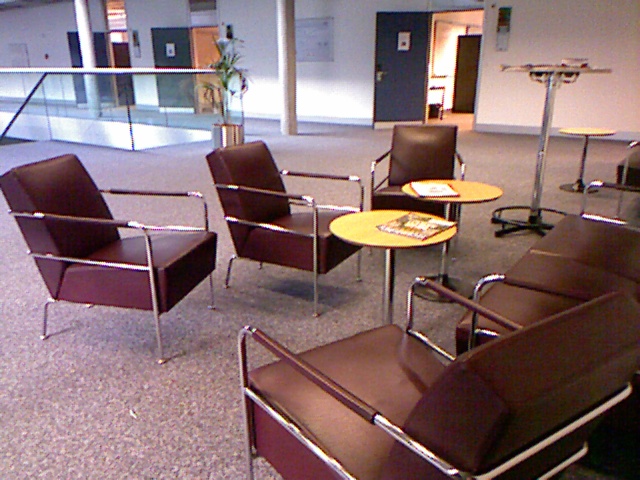
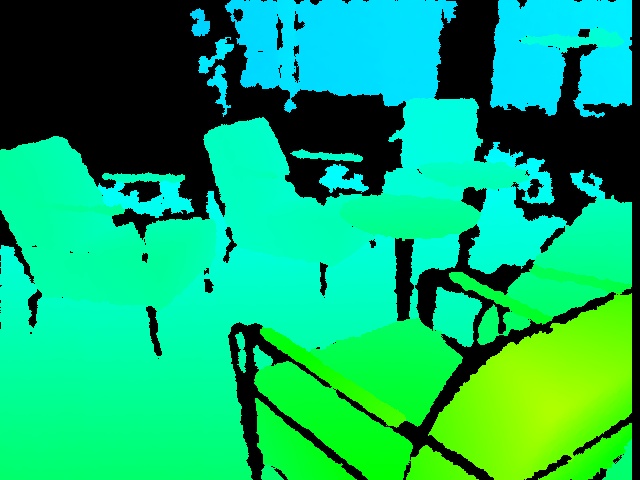
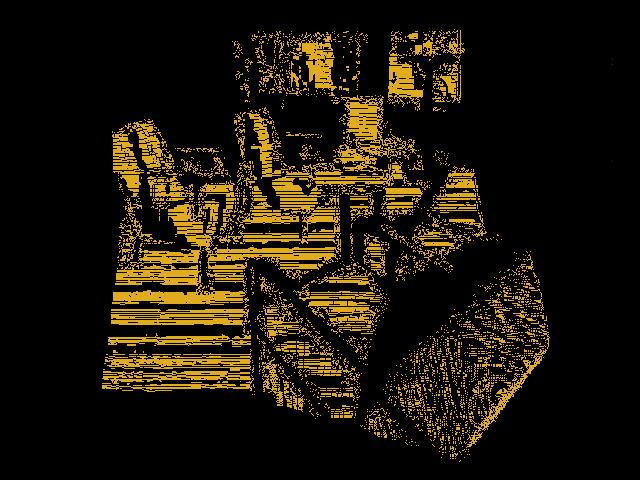
Visual, depth and 3D point cloud files
Sequences
Three training sequences will be provided for training and two additional for the final experiment
Rooms
These are all the rooms/categories that appear in the database
- Corridor
- ElevatorArea
- PrinterRoom
- LoungeArea
- ProfessorOffice
- StudentOffice
- VisioConference
- TechnicalRoom
- Toilet
Awards
There will be (at least) the following awards
- Best performance on the obligatory track
- Best Student
- Scientific Innovation
Scholarships
There will be a limited number of travel scholarships (around 500 CHF ) for those students that have submitted, at least, one run and are first author of the corresponding working note paper.
How to apply for the scholarships and more details will be given in next weeks.
Journal Publications
- We have been confirmed by the Machine Vision and Application journal that there will be a special issue on the ImageCLEF 2012 Robot Vision task.
- All groups that have participated to the tasks are warmly invited to submit to the journal special issue, as well as other groups who have registered for the data but eventually not submitted any run, as well as researchers interested in the topic.
- The official call for paper will be published by the end of this year/beginning of the next.
- Publication will follow the peer-review process, meaning that all papers will go through the review process --no invited papers
- For more information about the journal, please refer to http://www.springer.com/computer/image+processing/journal/138
Machine Vision and Applications: Special issue on Benchmark Evaluation of RGB-D based Visual Recognition Algorithms
Visual recognition is a critical component of machine intelligence. For a robot to behave autonomously, it must have the ability to recognize its surroundings (I am in the office; I am in the kitchen; On my right is a refrigerator). Natural human computer interaction requires the computer to have the ability to recognize human’s gestures, body languages, and intentions. Recently, the availability of cheap 3D sensors such as Microsoft Kinect has made it possible to easily capture depth maps in real time, and therefore use them for various visual recognition tasks including indoor place recognition, object recognition, and human gesture and action recognition. This in turn poses interesting technical questions such as:
1. What are the most discriminative visual features from 3D depth maps? Even though one could treat depth maps as gray images, depth maps consist of strong 3D shape information. How to encode the 3D shape information is an important issue for any visual recognition tasks.
2. How to combine depth maps and RGB images? An RGB-D sensor such as Microsoft Kinect provides a depth channel as well as a color channel. The depth map contains shape information while the color channel contains texture information. The two channels complement each other, and how to combine them in an effective way is an interesting problem.
3. What are the most suitable paradigms for recognition with RGB-D data? With depth maps, foreground background separations are easier, and in general, better object segmentations can be obtained than with conventional RGB images. Therefore the conventional bag of feature approaches may not be the most effective approaches. New recognition paradigms that leverage depth information are worth exploring.
Scope
This special issue covers all aspects of RGB-D based visual recognition. It emphasizes on the evaluation on two benchmark tasks: ImageCLEF Robotic Vision Challenge (http://www.imageclef.org/2012/robot) and CHALEARN Gesture Challenge (http://gesture.chalearn.org/). The special issue is also open to researchers that did not submit runs to either of the two challenges, provided they will test their methods on at least one of the two datasets. In addition to the two benchmark tasks, researchers are welcome to report experiments on other datasets to further validate their techniques.
Topics include but are not limited to:
- new machine learning techniques that are successfully applied to either of the two benchmark tasks
- novel visual representations that leverage the depth data
- novel recognition paradigms
- techniques that effectively combine RGB features and depth features
- analysis of the results of the evaluation on either of the two benchmark tasks
- theoretical and/or practical insights into the problems for the semantic spatial modeling task, and/or for the robot kidnapping task in ImageCLEF Robotic Vision Challenge
- theoretical and/or practical insights into the one-shot recognition problem in the CHALEARN Gesture Challenge
- computational constraints of methods in realistic settings
- new metrics for performance evaluations
Information for Authors:
Authors should prepare their manuscripts according to the author guideline from the online submission page of Machine Vision and Applications (http://www.editorialmanager.com/mvap/).
Important Dates (tentative):
- Manuscript submission deadline: January 30, 2013
- First round review decision: May, 2013
- Second round review decision: September, 2013
- Final manuscript due: November, 2013
- Expected publication date: January, 2014
Guest Editors:
- Barbara Caputo, Idiap Research Institute, Switzerland
- Markus Vincze, The Institute of Automation and Control Engineering, Austria
- Vittorio Murino, Istituto Italiano di Tecnologia, Italy
- Zicheng Liu, Microsoft Research, United States
Performance evaluation
The following rules are used when calculating the final score for a run:
Task 1:
- For each correctly classified frame: +1 points
- For each misclassified frame: -1 points
- For each frame that was not classified: +0 points
Task 2:
- For each correctly classified frame: +1 points
- For each misclassified frame: -1 points
- For each frame that was not classified: +0 points
- Additional points for kidnappings
- All the WindowSize frames after a kidnapping will obtain an additional point if they are correctly classified.
- No additional penalization is applied for misclassified frames
- WindowSize = 4 for the final test

Performance Evaluation Script
Python module/script is provided for evaluating performance of the algorithms on the test/validation sequence. The script and some examples are available:
- as a TAR/GZIP archive for Linux users robotvision.tgz
- as a ZIP archive for Windows users robotvision.zip
Python is required in order to use the module or execute the script. Python is available for Unix/Linux, Windows, and Mac OSX and can be downloaded from http://www.python.org/download/. The knowledge of Python is not required in order to simply run the script; however, basic knowledge might be useful since it can also be integrated with other scripts as a module. A good quick guide to Python can be found at http://rgruet.free.fr/PQR26/PQR2.6.html.
The archive contains five files:
- robotvision.py - the main Python script/module
- example.py - small example illustrating how to use robotvision.py as a module
- example1.results - example of a file containing fake results for the training 1 sequence
- example2.results - example of a file containing fake results for the training 2 sequence
- example3.results - example of a file containing fake results for the training 3 sequence
When using the script/module, the following codes should be used to represent a room category:
- Corridor
- ElevatorArea
- PrinterRoom
- LoungeArea
- ProfessorOffice
- StudentOffice
- VisioConference
- TechnicalRoom
- Toilet
- empty string - no result provided
The script calculates the final score by comparing the results to the groundtruth encoded as part of its contents. The score is calculated for one set of training/validation/testing sequences.
Using robotvision.py as a script
robotvision.py can simply be executed as a script. Given that Python is already installed, running the script without any parameters will produce the following usage note:
/========================================================\
|                     robotvision.py                     |
|--------------------------------------------------------|
| RobotVision@ImageCLEF'12 Performance Evaluation Script |
| Author: Jesus Martinez-Gomez, Ismael Garcia-Varea      |
\========================================================/

Error: Incorrect command line arguments.

Usage: robotvision.py results_file test_sequence task_number

Arguments:
  *results_file  - Path to the results file. Each line in the file
                    represents a classification result for a single
                    image and should be formatted as follows:

  *test_sequence - ID of the test sequence: 'training1', 'training2' or 'training3'
  *task_number   - # number of the task: task1 (without temporal continuity ) or task2 (temporal continuity and kidnapping)
In Linux, it is sufficient to make the robotvision.py executable (chmod +x ./robotvision.py) and then type ./robotvision.py in the console. In Windows, the .py extension is usually assigned to the Python interpreter and typing robotvision.py in the console (cmd) is sufficient to produce the note presented above.
In order to obtain the final score for a given training sequence, run the script with the parameters described above e.g. as follows:
robotvision.py example2.results training2 task1
The command will produce the score for the results taken from the example2.results file obtained for the training2 sequence and task 2. The outcome should be as follows:
Selected Arguments:
  results_file  = example2.results
  test_sequence = training2
  task_number   = task2

Calculating the score...
Done!

===================
Final score: -1208.0
===================
Each line in the results file should represent a classification result for a single image. Since each image can be uniquely identified by its frame number, each line should be formatted as follows:
<frame_number> <area_label>
As indicated above, <area_label> can be left empty and the image will not contribute to the final score (+0.0 points).
Using robotvision.py as a module in other scripts
robotvision.py can also be used as a module within other Python scripts. This might be useful in case when the results are calculated using Python and stored as a list. In order to use the module, import it as shown in the example.py script and execute the evaluate function.
The function evaluate is defined as follows:
def evaluate(results, testSequence, unknownRooms = [])
The function returns the final score for the given results and test sequence ID.
The function should be executed as follows:
score = robotvision.evaluate(results, testSequence, task)
with the following parameters:
- results - results table of the following format:
results = [ ("<frame_numer1>", "<area_label1>"), ..., ("<frame_numberN>", "<area_labelN>") ] - testSequence - ID of the test sequence, use "training1" "training2" or "training3"
- task - ID of the task, use "task1" or "task2"
Kidnappings
The main difference between sequences of frames with and without kidnappings relies on the room changes. Room changes in sequences without kidnappings are usually represented by a small number of images showing a transition as the one shown in the image below.

On the other side, when kidnappings are present room changes are represented by a drastic change for frames. This situation is represented below.

Useful information for participants
The organizers propose the use of several techniques for features extraction and cue integration. Thanks to these well documented techniques with open source available, participants can focus on the development of visual features while using the proposed method for cue integration or vice versa.
In addition to feature extraction and integration, the organizers also provide useful information as the point cloud library and a technique for taking advantage of the temporal continuity.
Features generation
Visual images:
- Pyramid Histogram of Oriented Gradients (PHOG)
Depth images:
- Normal Aligned Radial Feature (NARF)
- Article to refer: Steder, B.; Rusu, R.B.; Konolige, K.; Burgard, W.; , "Point feature extraction on 3D range scans taking into account object boundaries," Robotics and Automation (ICRA), 2011 IEEE International Conference on , vol., no., pp.2601-2608, 9-13 May 2011
- Source code for download (C++): How to extract NARF Features from a range image
Cue integration
Learning the classifier
- Online-Batch Strongly Convex mUlti keRnel lEarning: OBSCURE
- Article to refer: Orabona, F.; Luo Jie; Caputo, B.; , "Online-batch strongly convex Multi Kernel Learning," Computer Vision and Pattern Recognition (CVPR), 2010 IEEE Conference on , vol., no., pp.787-794, 13-18 June 2010
- Source code for download (Matlab): Dogma
Temporal Continuity
Selecting a prior class for low confidence decissions
- Idiap 2010 RobotVision Proposal
- Technique: Once a frame has been identified as low confidence, we use the classification results obtained for the last n frames to
solve the ambiguity: if all the last n frames have been assigned to the same class Ci, then we can conclude that all frames come from the same class Ci, and the label will be assigned accordingly. - Article to refer: Martinez-Gomez, J. and Caputo, B. (2011). Towards Semi-Supervised Learning of Semantic Spatial Concepts. In ICRA 2011. Proceedings of the 2011 IEEE International Conference on Robotics and Automation, Shanghai, China. Pages 1936 - 1943
- Source code for download : not necessary
- Contact person: jesus.martinez@uclm.es
3D point cloud processing
Framework with numerous state-of-the art algorithms including filtering, feature estimation, surface reconstruction, registration, model fitting and segmentation.
- The Point Cloud Library: PCL
- Documentation: http://pointclouds.org/documentation/
- Article to refer: Rusu, R.B., Cousins, S.: 3D is here: Point cloud library (PCL). In: Proc. of the Int. Conf. on
Robotics and Automation (ICRA). Shanghai, China (2011) - Source code for download : http://pointclouds.org/downloads/
- Contact: http://pointclouds.org/contact.html
Sponsors:
SNSF (Swiss National Science foundation )vision@home
Acknowledgments:
This work is partially supported by the Spanish MICINN under projects MIPRCV Consolider Ingenio 2010 (CSD2007-00018) and MD-PGMs CICYT (TIN2010-20900-C04-03)

| Attachment | Size |
|---|---|
 depth_2060pcd.jpg depth_2060pcd.jpg | 70.59 KB |
 depth.txt depth.txt | 53.06 KB |
| rgb.txt | 49.32 KB |
